Five O&P Workflow Fixes, Shown in the Nymbl Platform
Every orthotics and prosthetics practice has a sticky note on a monitor. A spreadsheet that started as a temporary fix and quietly became core infrastructure. One person who knows exactly how a particular payer behaves, and a small wave of panic the day they call in sick. And clinical notes that were definitely going to get written between patients, now waiting for them at eight o'clock at night.
In a recent webinar, Nymbl Solutions Engineer Josh Black made a point worth sitting with: those workarounds aren't a sign of a disorganized team. They're the opposite. They exist because people are resourceful. They find ways to keep moving even when the software underneath them isn't pulling its weight. The trouble starts when a workaround stops being a one-off and becomes part of the daily routine.
Josh has run roughly 100 Nymbl implementations across about 300 locations, and he keeps seeing the same shapes. Every practice feels uniquely chaotic; the chaos is remarkably consistent. So he proposed a simple test for any workaround you spot in your own office:
When you find a workaround, ask one question: does it exist because the system can't do something, or despite a system that can? If the system can do it and the team just isn't, that's a training problem. If the system genuinely can't, no amount of "please remember to…" will fix it.
His read, after all those implementations, is that the friction is usually system-driven. The team is just absorbing it on the software's behalf. What follows is his map of where that friction lives, and then the part nobody wants to skip to but everybody came for: the live demo.
PART ONE - THE DIAGNOSIS
Five places the work slows down
Across hundreds of practices, the same five breakpoints show up again and again. None of them explode on contact. They wait and then surface two weeks later as a denial, an aging claim, or a patient who's been sitting in limbo.

Intake & referral handoff. A referral arrives faxed, maybe missing insurance, maybe missing a diagnosis code, with the provider note buried somewhere on page three. Someone has to read it, key it, route it, and chase what's missing. Miss something here and it doesn't show up until billing.

Documentation. Everyone knows the patient and the device; the hard part is turning that into a complete, compliant note while seeing other patients, answering questions, and fielding interruptions. Routine visits are the sneakiest, since muscle memory hides the gaps.

Task ownership. Every device in progress drags a trail of follow-ups behind it. Teams are tracking them, in an inbox, a Teams/Slack message, a sticky note. The problem is where they're tracked, not whether.

The admin-to-billing handoff.
The most expensive place to break, because everyone's involved. When clinical, admin, and billing work in separate systems that don't talk, details get entered twice and changes don't carry across.

Leadership visibility.
Less a workflow than the absence of one. A denial trend starts in week one and nobody sees it until week six. A payer slows down; it's only obvious once the AR has aged. The goal isn't more data, since everyone has data. It's usable visibility.
PART TWO - THE TREATMENT PLAN
The same five areas, connected
The core idea behind Nymbl isn't that you can do intake, notes, and billing in one place. It's that those things stay connected around the patient, their prescription, and the day's work, so the team moves work forward instead of carrying information across the business by hand.
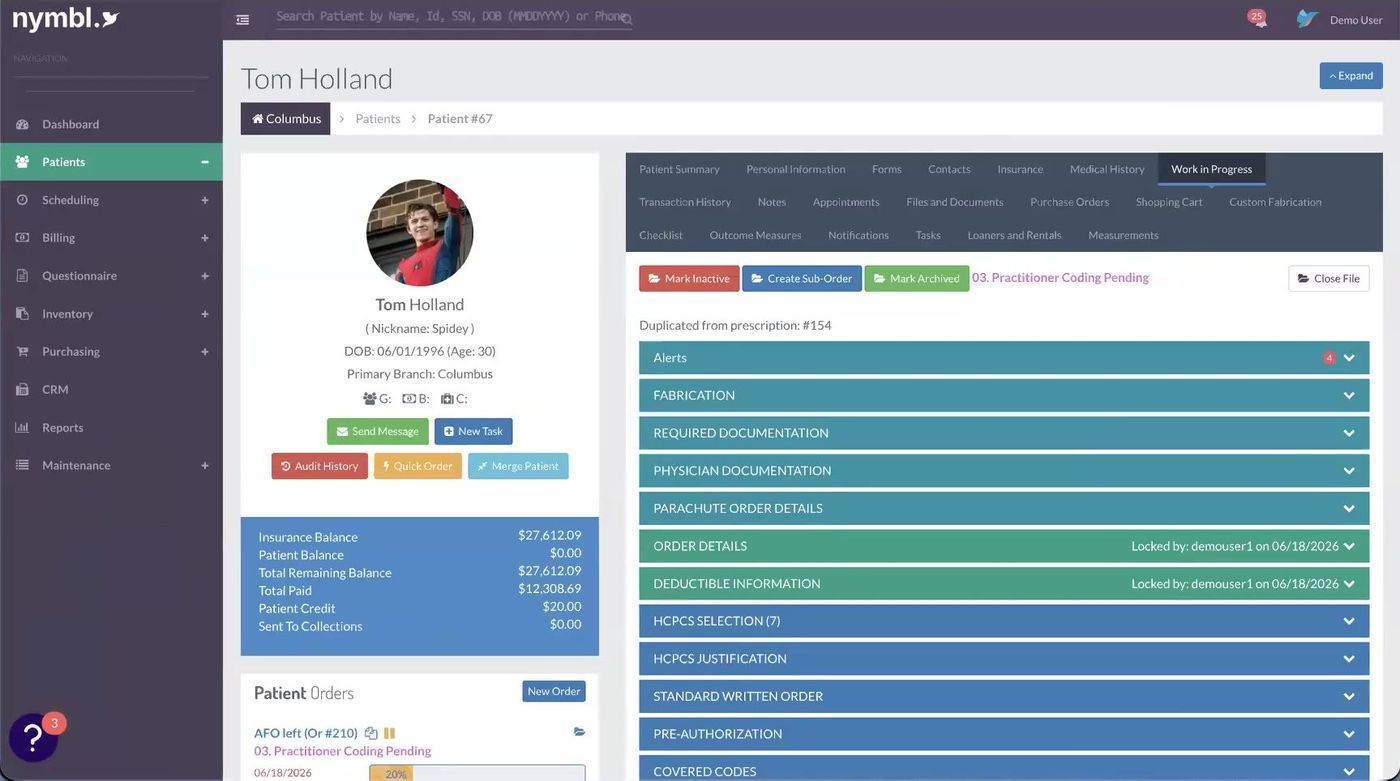
The chart is the spine.
Every module routes back here, appointments, transactions, purchase orders, and the active work in progress, so one screen answers "what's going on with this patient?"
FIX #1 - INTAKE
Referrals that file themselves
Through Nymbl's
e-fax partnership with Medsender, you keep the fax number your referral sources already use, but the fax starts working for you. Instead of a tray of paper, your inbox tells you what each document is and, crucially, which patient it belongs to.
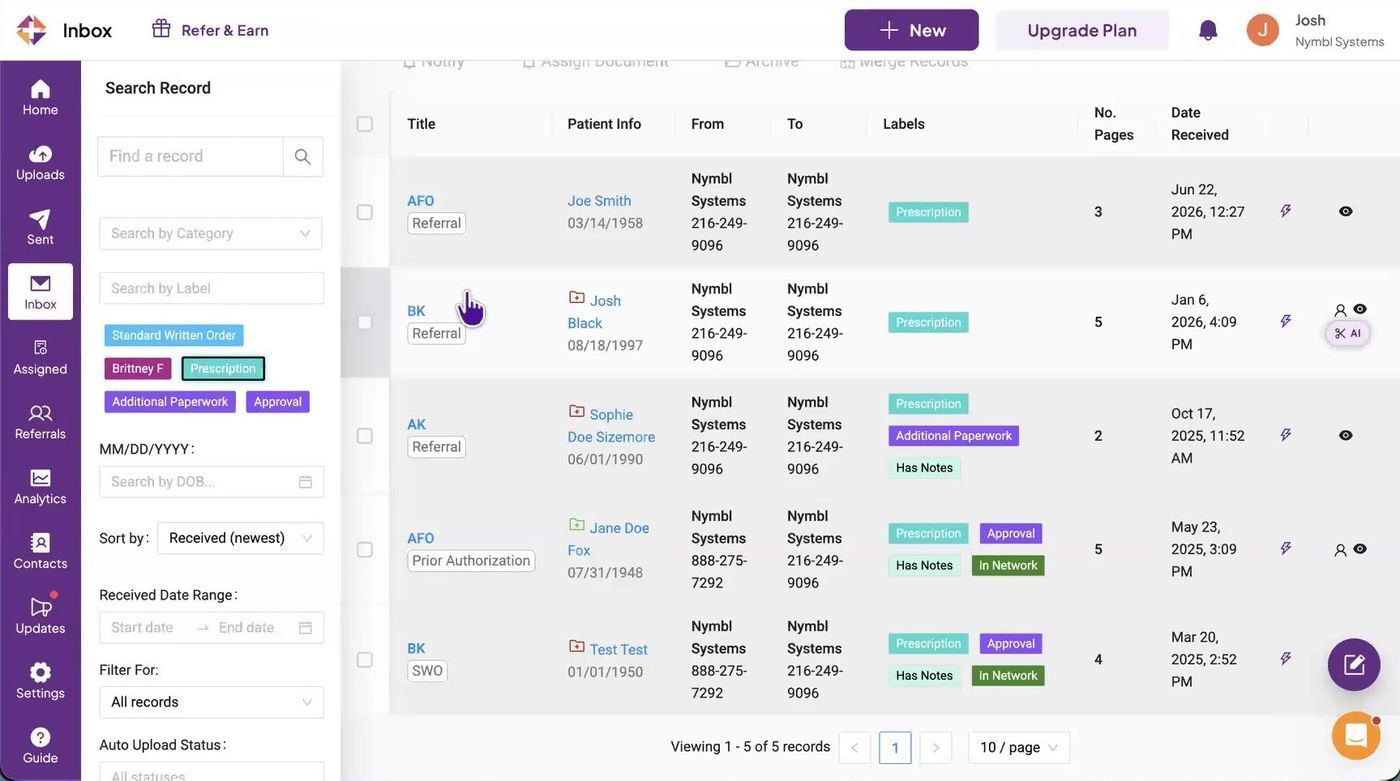
The inbox does the sorting.
OCR reads each fax and tags it (referral, prescription, SWO, approval) and matches it to a patient before anyone touches it.
When a referral is for someone new, you don't copy and paste a thing.
Create New Chart scrapes the demographics and contacts off the fax, regardless of how it's formatted, and stages them for intake. The referral itself lands on the patient's chart automatically when you're done.
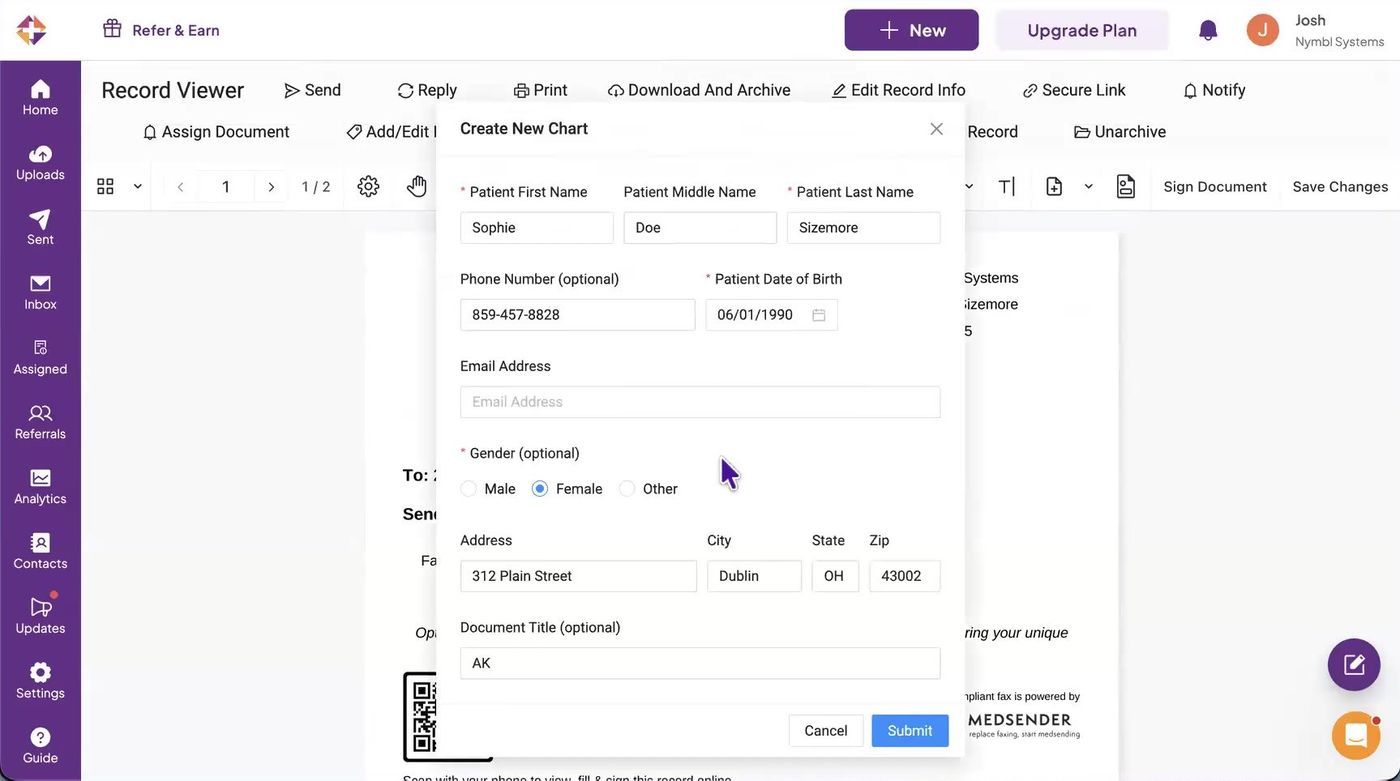
OCR fills the form.
Name, DOB, phone, and address arrive pre-populated from the referral, saving five to ten minutes of retyping on every new patient.
FIX #2 - DOCUMENTATION
A note that's mostly written before you sit down
Nymbl's
AI Notes works two ways. You can record the full visit, which separates speakers, tags clinician and patient, and keeps who-said-what straight, then compiles it into a clean, structured draft. Or, when you've only got five minutes between patients, you do what Josh calls the "TL;DR": rattle off everything you remember and let Nymbl clean up the filler while keeping the parts that matter.
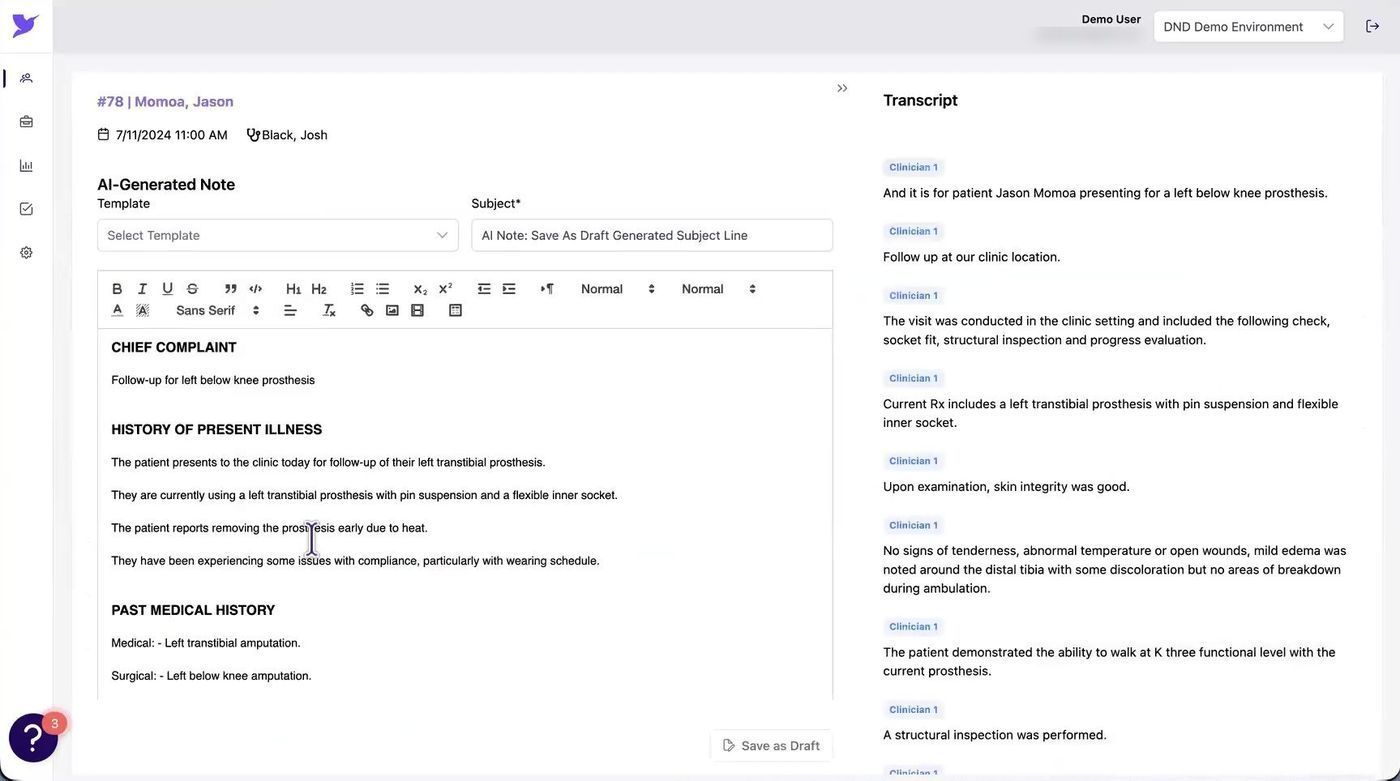
Draft on the left, transcript on the right.
The note arrives organized into Chief Complaint, HPI, and Past Medical History. Templates still drop in, and you keep full control of the final output before it's published.
The win isn't only faster notes. It's capturing more, typing less, and ending the day without a backlog of documentation debt.
FIX #3 - TASK OWNERSHIP
One view of every order before delivery
Most O&P teams call this their WIP, and Josh is blunt about it: for most practices the WIP is the heartbeat of the business. Nymbl's
Order Summary puts every pre-delivery prescription in one place, with the status each one is in, who owns it, how long it's been sitting, and what happens next.
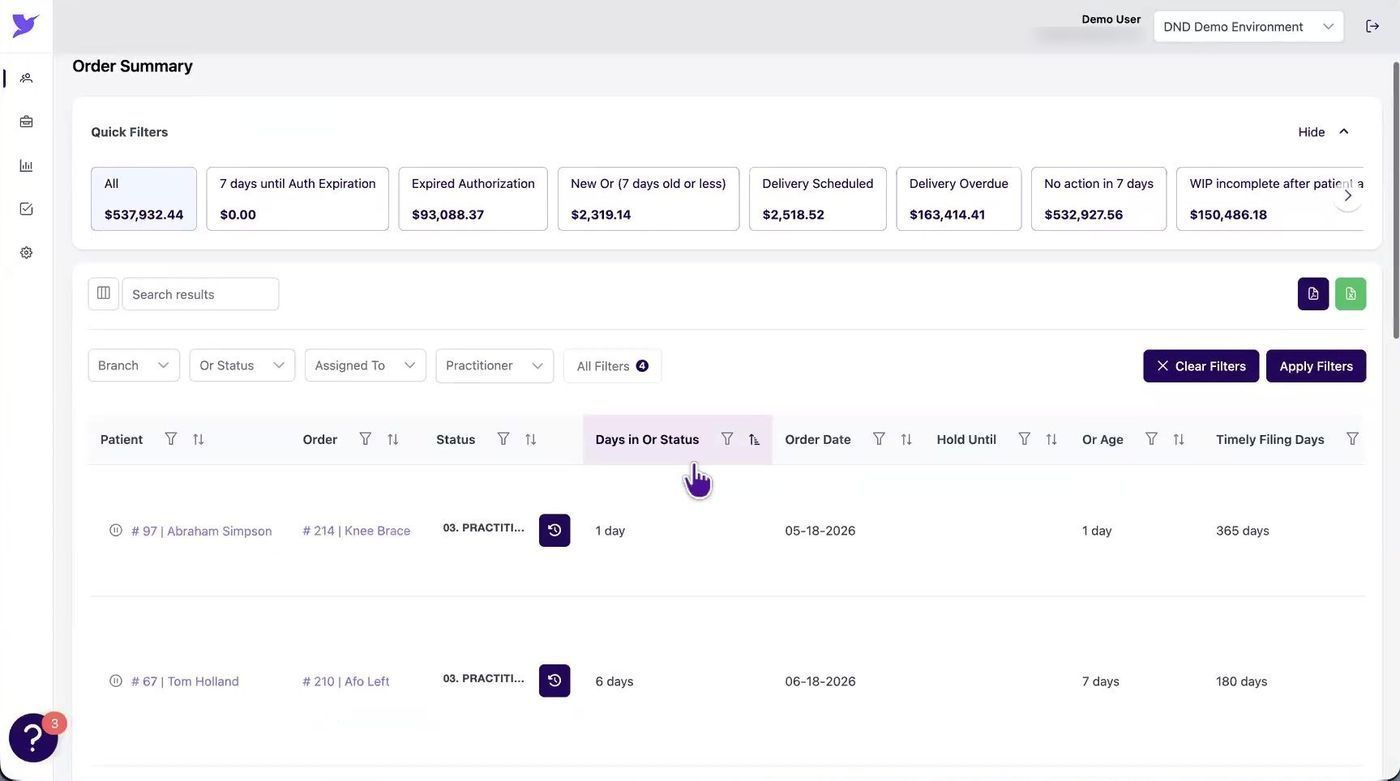
Build the tracker around your role.
Practitioners might keep five columns; admins keep all forty. Quick filters surface expired authorizations, anything with no action in seven days, and orders aging past timely-filing windows.
Two things make this more than a list. First, the statuses are yours. Nymbl works with your team during implementation to map how handoffs actually happen, because every practice gets from A to Z differently. Second, the aging is visible: if an order has been waiting 722 days for an SWO, that patient has almost certainly gone elsewhere, and now you can see it instead of discovering it.
FIX #4 - THE HANDOFF
Catch it before it reaches billing
The best billing workflow starts long before billing, with cleaner intake, better documentation, and a way to catch problems before the claim goes out. One small example Josh highlighted: a filter for orders where a practitioner changed an HCPCS code after the fact. If the code changes after the SWO went out, the documentation no longer matches what you plan to bill, and this filter flags exactly which orders need new paperwork.
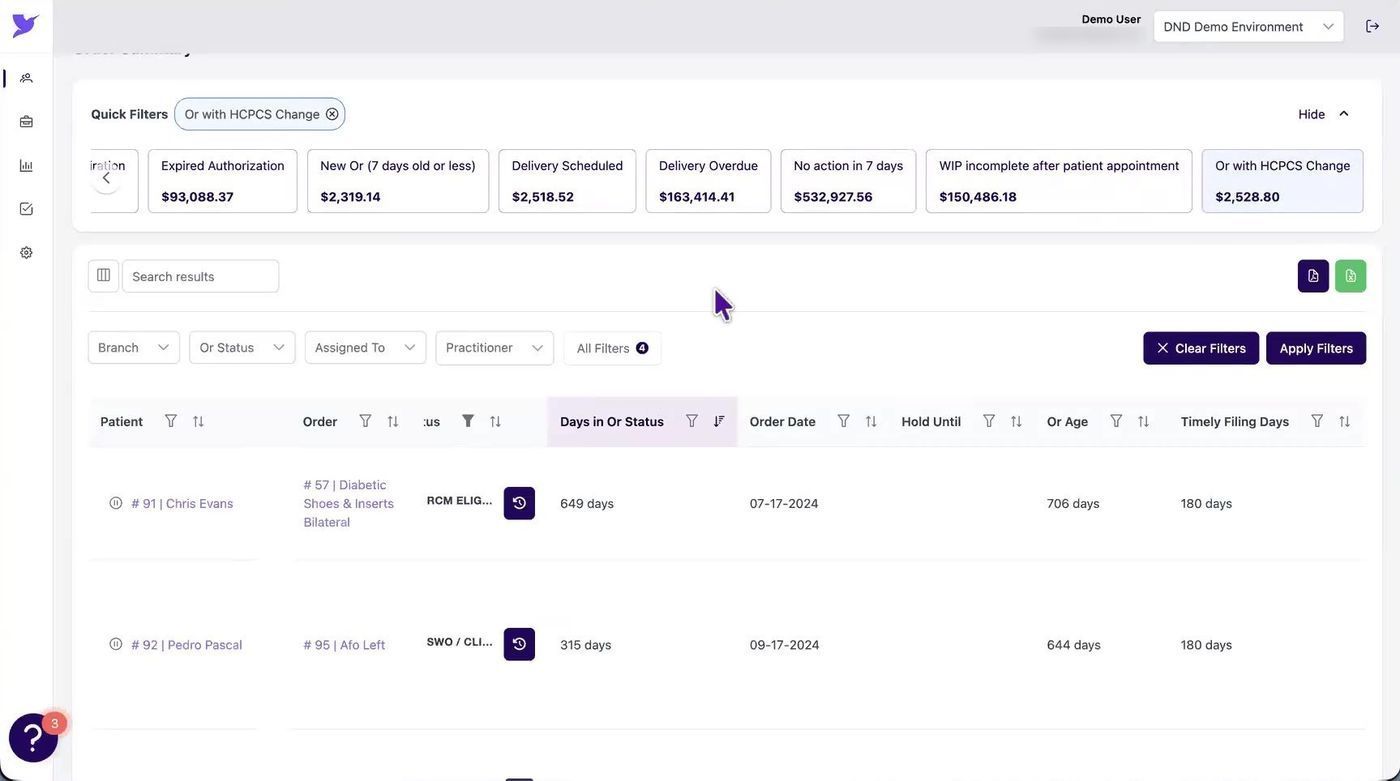
Coding changed after the SWO?
The "with HCPCS change" filter keeps admin staff in sync with practitioners on which orders need fresh documentation and which are good to go.
Layered on top is a configurable alert system. Alerts can be broad, like a warning any time a given insurance, device, or referral source appears on a chart, or precise, down to the HCPCS-and-diagnosis-code level: this code with Aetna requires an authorization; this diagnosis with this device doesn't qualify. They surface during everyday work, so issues get caught on the front end instead of bouncing back from billing.
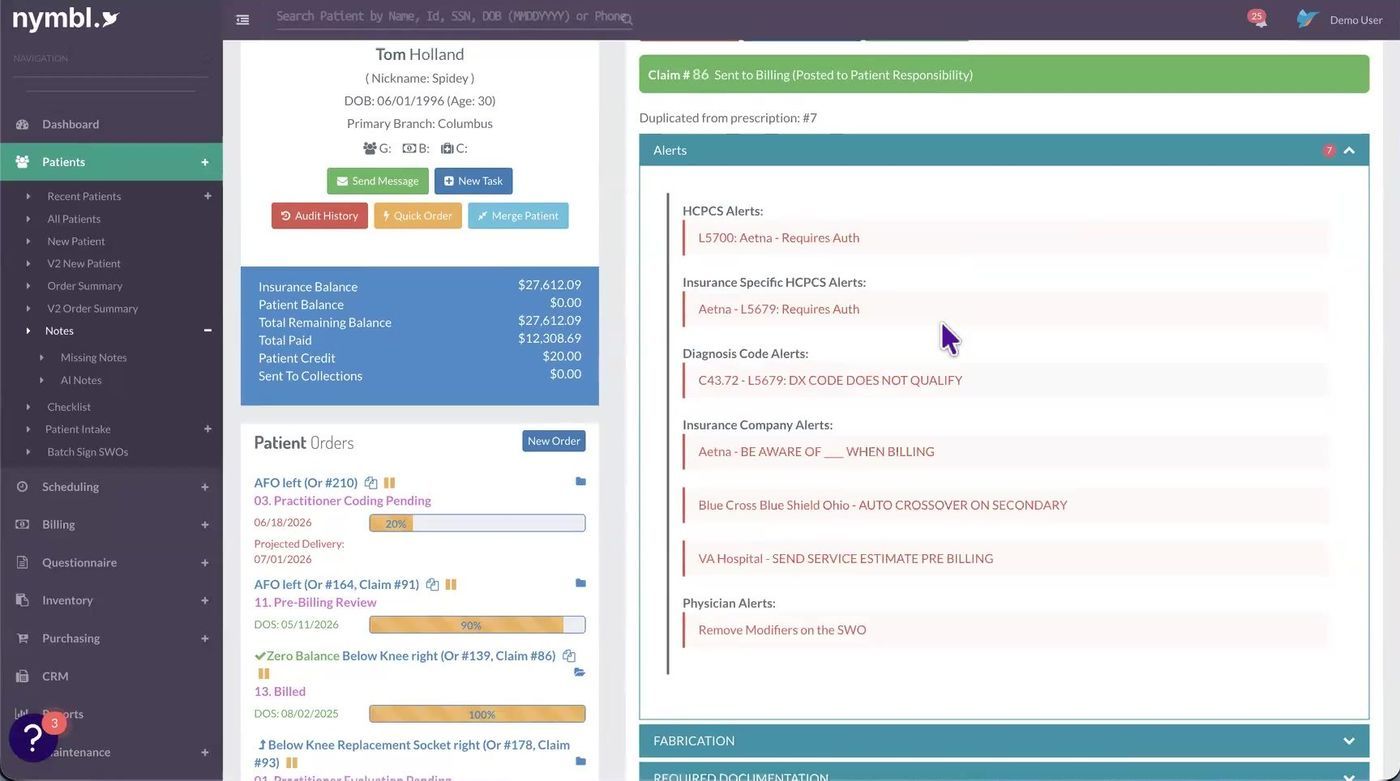
Rules you configure, surfaced where the work happens.
Because a change in one place carries to the others, a biller who needs an old form or note can pull it from the claim screen, and nothing gets entered twice.
FIX #5 - VISIBILITY
Run the business at a glance
The final fix addresses the breakpoint that isn't really a workflow. Nymbl's
BI dashboards, built on Amazon QuickSight and shaped by years of working with practices, ship as ready-to-go, best-in-practice views, so leaders aren't rebuilding spreadsheets to see how the business is doing.
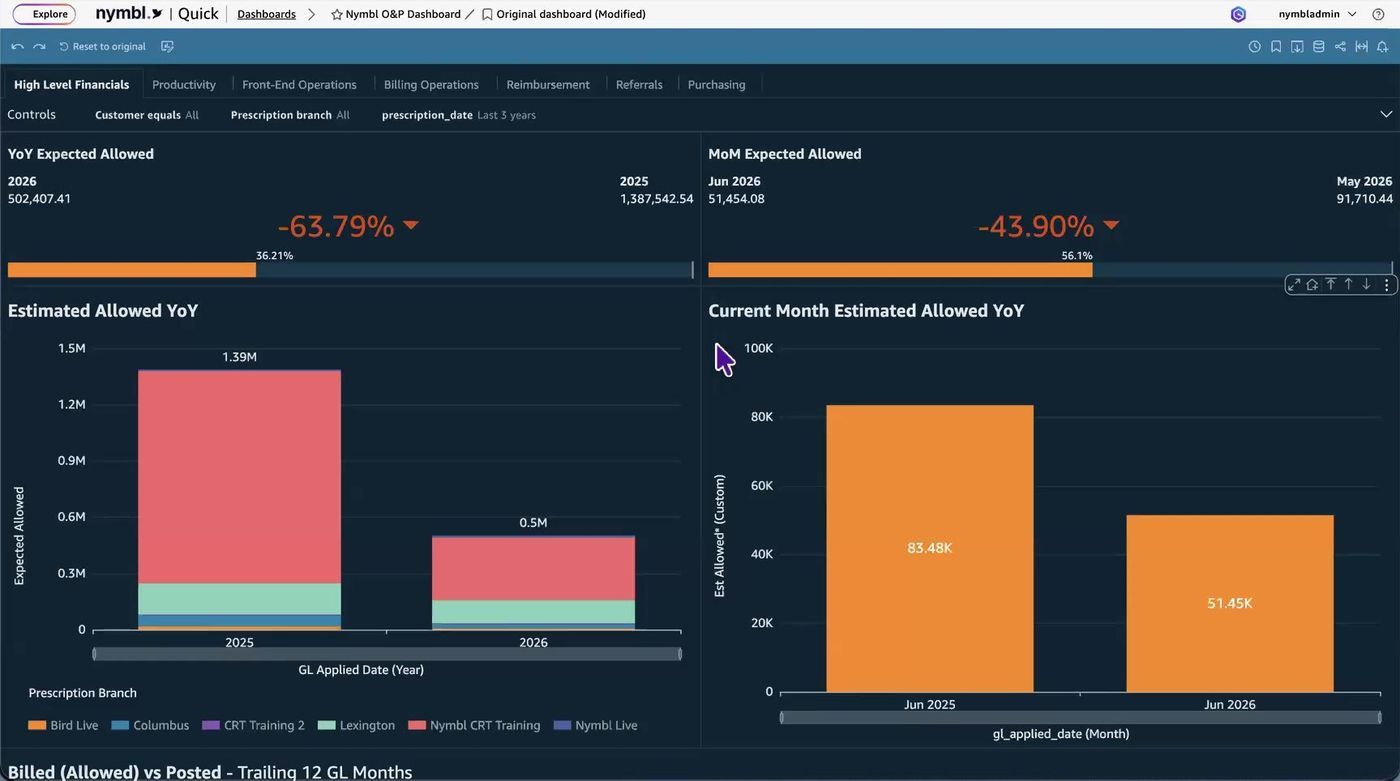
Financials, productivity, referrals, reimbursement, purchasing.
Dashboards are permission-based, drillable, exportable to CSV, and can be emailed as scheduled snapshots to anyone who'd rather not log in.
Beyond billed-versus-collected and margins by payer, practitioner, or location, Josh called out one report he thinks is underused: a length-of-care timeline. It tracks the whole journey, from door to evaluation, evaluation to delivery, delivery to billing, submission to paid, so you can ask "how long does this take when Dino is the practitioner, Josh is the admin, and it's this device?" and actually see where the bottleneck is. Think of it as DSO with a lot more resolution.
What "connected" actually looks like
The numbers customers talk about
30 min–2 hrs
saved per clinician, per day
3 → 1 days
to publish notes
< 5%
denial rate, vs. a 10–15% industry norm
From the Q&A
A few questions that came up live, in case they're yours too.
Where do I find the Order Summary "spreadsheet" view?
It lives under the Patients tab, as the V2 Order Summary. If your practice prefers the word "prescription" over "order," that label is customizable, so call it whatever your team already calls it.
What does OCR stand for?
Optical character recognition, technology that reads printed or handwritten text from images and scanned documents and converts it into data the system can understand. It's what lets a faxed referral populate an intake form on its own.
How do I get access to the QuickSight dashboards?
If you're on the standard package and don't have access yet, reach out to Nymbl support to get a QuickSight login linked. Once it's set up, a new area appears under your Reports tab that jumps you straight to the dashboards, so bookmark it for quick access.
This article is adapted from the Nymbl webinar “Where O&P Workflows Break and How to Fix Them,” presented by Josh Black, Solutions Engineer. Screenshots are taken from the live product demo. The full recording is available
here.
Curious whether your workarounds are training or system?
If you're already on Nymbl and want to find the Order Summary, AI Notes, or your dashboards, support can point you to all three. If you're not on Nymbl yet, the team is happy to walk through the platform and figure out whether it's a fit.