What Interoperability Means for Your O&P Practice: Why Your Software Should Work Together, and 3 Ways It Can
Picture a normal morning at an orthotics and prosthetics practice. A referral comes in from a doctor’s office. Someone reads it and types the details into the practice’s main software. Later, someone else types the same details into a scheduling tool, then again into a billing service, then again into a spreadsheet that tracks inventory. Each time, the information is copied by hand, and each copy is a chance for a typo, a delay, or a record that no longer matches the others.
That daily retyping is the problem interoperability solves.
Interoperability simply means that separate software products can pass information to one another in a form each can use, so something entered in one place shows up in the others without a person carrying it across. The practice enters it once, and everything else stays current.
Most practices don’t run on one piece of software. They run on several: the main system where patients, prescriptions, and claims live, plus other products they’ve bought, and sometimes tools built specifically for them. For Nymbl customers, the main system is Nymbl, and the goal is for everything else to stay in step with it. There are three ways that happens, and they build on one another.
We’ll walk through them in order, starting with the most common situation: a practice using a popular product that many other practices use too.
1. Software you already use: connectors
If many practices use the same product, it makes sense to build the link to that product once and let everyone use it. That link is called a connector. It teaches Nymbl how to work with one specific product, passing information in both directions. Any customer who uses that product can have the connector turned on, and nobody has to start from scratch.
Parachute Health shows how this works. Doctors and other referring providers place orders for equipment there. Before a connector, a practice would see the order in Parachute and then re-enter it into its own system. With the connector, an accepted order shows up in Nymbl on its own, in a queue, with the order’s documents attached. Staff turn it into a prescription from there.
It also works in the other direction. As staff work the order, status updates and notes flow back to Parachute, so the doctor’s office can see progress without calling or emailing. The order was entered once, and both sides know where it stands.
Fax is another everyday example. Many referrals still arrive as faxes, and practices use eFax tools to receive them. Nymbl’s connection with
MedSender covers those eFax workflows, so documents move between the fax tool and Nymbl without someone downloading, saving, and re-attaching each one by hand.
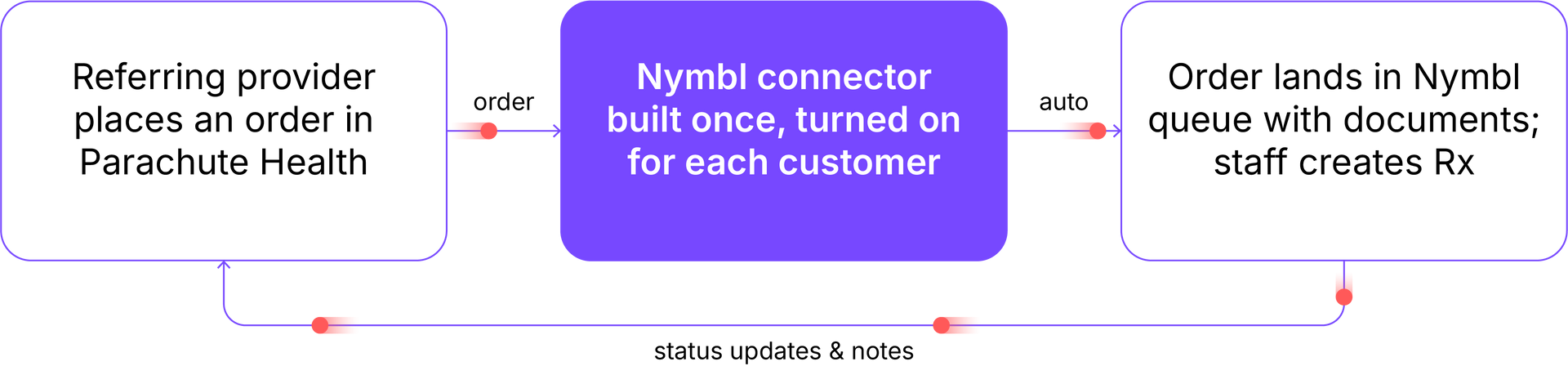
Figure 1. An accepted Parachute Health order flows into Nymbl, and status flows back.
What to ask a vendor:
“Which products do you connect to today, and does information move both ways?”
A connector works well when lots of practices use the same product. But no list of connectors can ever cover everything. Any software we haven’t built a connector for yet needs another way in. It might be a tool built just for one practice, or a well-known product in the industry that simply isn’t part of our system today. Either way, something more flexible is needed.
2. Any other software: the API
An API (application programming interface) is a documented way for other software to read information from Nymbl and send information back to it, automatically. Instead of someone logging in to look something up or type something in, the other software does it directly, using only the permissions it has been given.
Because it’s open to any approved software, the practice, or an IT partner working for them, can connect whatever they’ve built or chosen. Here is an example from billing.
When a practice bills insurance, claims usually travel through a clearinghouse, a kind of mail-sorting center that checks each claim and routes it to the right insurance company.
One customer wanted to send claims through a different billing service that Nymbl hadn’t built a link to. Without a way in, that meant a manual routine: pull the claim details out of Nymbl, submit them elsewhere, and later type the payments back in by hand. Because claim and payment information is available through the API, they replaced that routine with an automated one. Claims go out through the service they chose, and the payment results come back into Nymbl, which stays the complete record of what was billed and what was paid. Nothing about their billing arrangement had to change to fit the software.
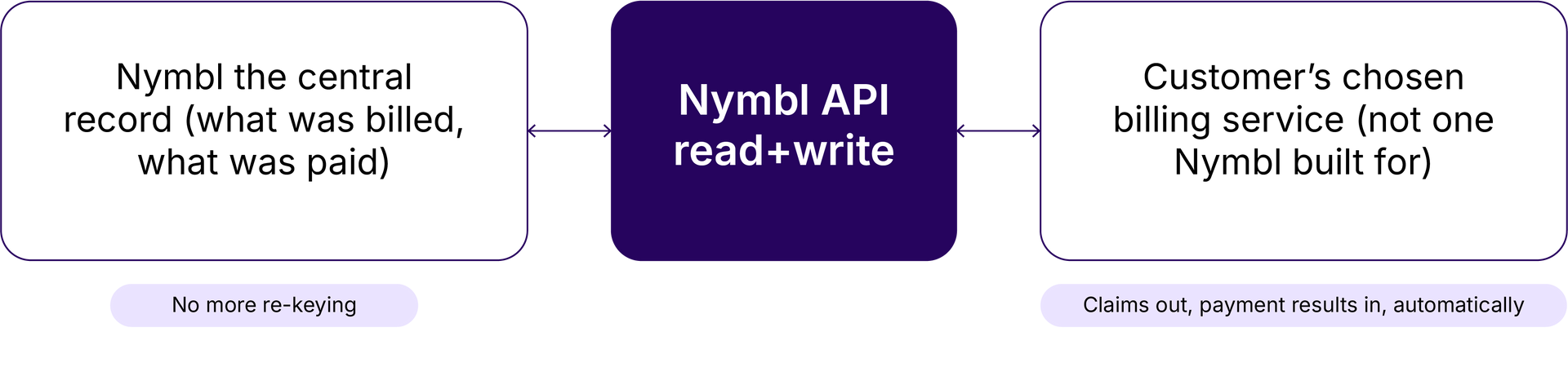
Figure 2. With the API, a customer can use the billing service they choose and keep Nymbl as the record.
Access is controlled, by design.
Nymbl decides what each outside program may read or write, and anyone other than the practice itself whose software touches patient information signs a privacy agreement (called a business associate agreement) first. Opening the doorway is something we set up together, not something that happens by accident.
What to ask a vendor:
“Can our own software, or a partner working for us, read and write to your system? And if we use a different billing service, can it still work with yours?”
The API solves the question of how information gets in and out. It leaves a different question open: how does your software know when there’s something new to ask about?
3. Staying current: event streaming
Without any help, outside software has to keep checking. Every few minutes it asks Nymbl, “Anything new?”, compares the answer to last time, and acts on what changed. That works, but it’s like refreshing your inbox all day instead of getting a notification. It’s slow, things get missed, and it puts steady load on everyone.
Event streaming flips it around. An event is a small notification that something just happened: a prescription was created, an appointment started, a delivery was confirmed. Nymbl announces each event the moment it happens. The subscriber chooses where it goes, and their software reacts right away.
That last part matters. The other system does the work, on its own terms: Nymbl just tells it what happened, and the other system decides what to do. Everything that has signed up hears the same event at the same moment, so systems move together instead of drifting apart and being reconciled later.
One customer used this to build a live view of their clinics: which clinicians were in appointments, who was running behind, what had finished. Their dashboard signs up for appointment and clinician events from Nymbl. When a clinician starts an appointment, the event arrives, the dashboard reads the details, and the board updates. When the clinic acts on what it sees, the dashboard writes the changes back. There’s no refresh schedule and no nightly update. The dashboard is current because Nymbl tells it the moment anything changes.
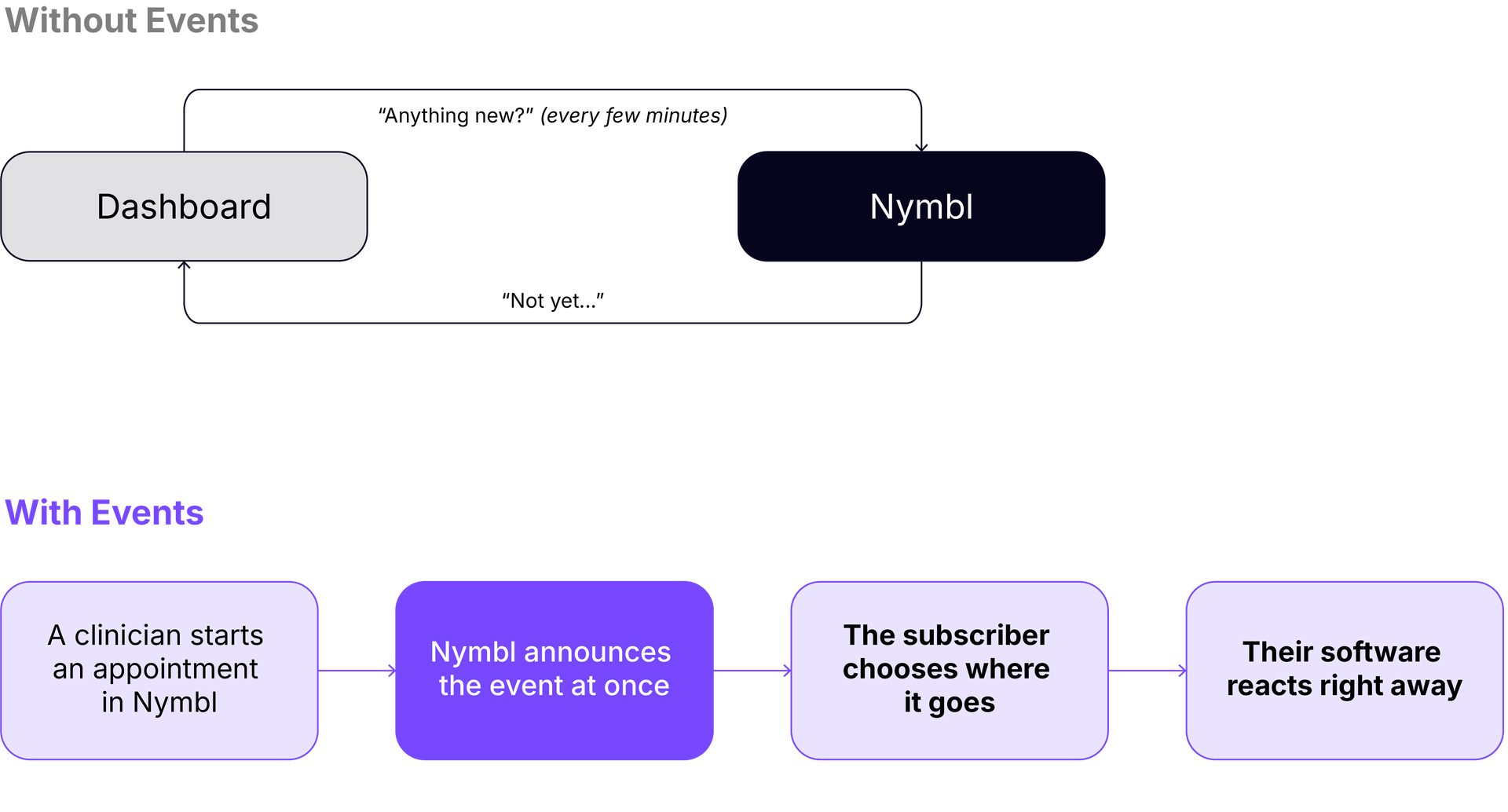
Figure 3. Asking repeatedly versus being told: how event streaming changes the timing.
The same idea applies to anything a practice wants kept in sync: an inventory system that should know when a prescription is created, a report that should reflect today, a partner’s software that needs to act when a claim is paid.
What to ask a vendor:
“When something changes in your system, can other systems be notified right away, or do they have to check?”
Putting it together
Each of these answers a different situation. Products many practices share get connected once, for everyone. Software without a connector can reach Nymbl through the API. And when anything changes, the systems that care find out immediately.
What that looks like day to day is less retyping, fewer mismatched records, and fewer moments when someone has to log in somewhere else to find out what is true. Nymbl holds the record, and everything else stays in step with it.
If you’re wondering how your own software, or a partner’s, could connect to your data,
schedule a demo and tell us the problem you’re trying to solve. We’ll walk through which of these fits.
About the author:
John Bennett
is Principal Architect at Nymbl, where he designs the cloud and event-driven systems that help connect Nymbl with the software practices rely on every day. He brings years of experience modernizing enterprise applications for the cloud, including prior architecture leadership roles at SPR, Prime TSR, and JPMorgan Chase.